
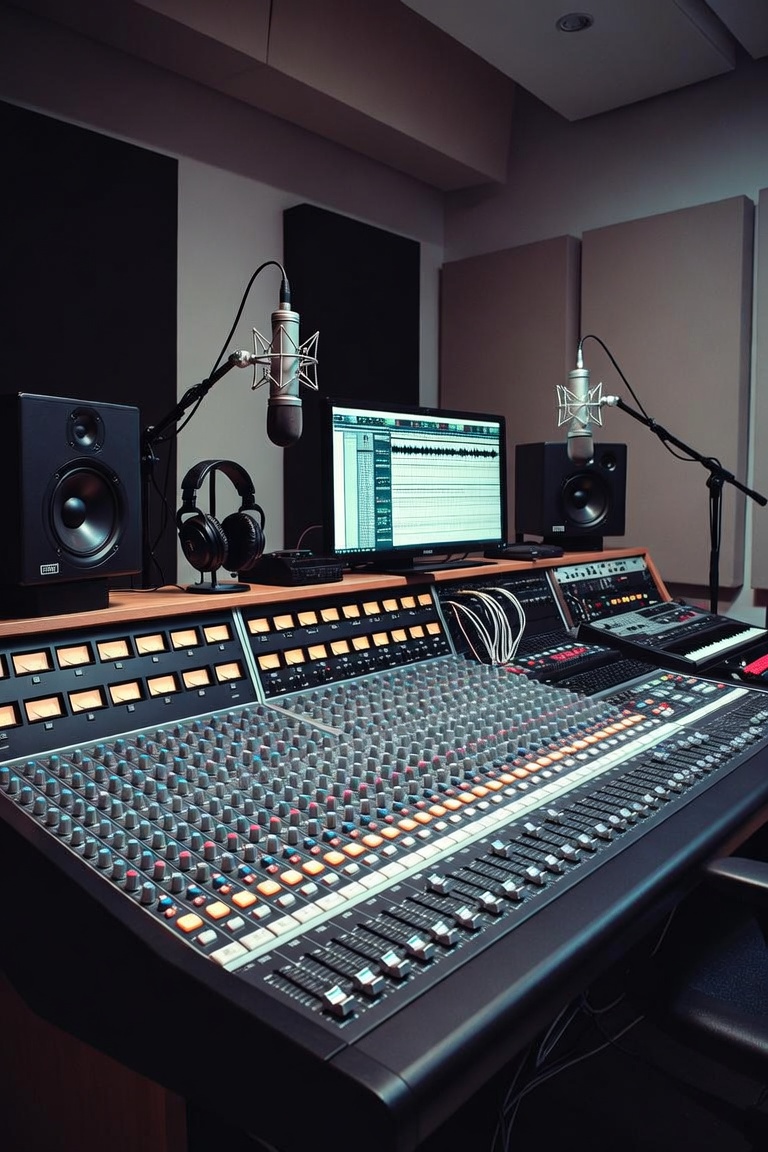
A professional home studio setup is one of the best investments a music producer can make. You do not need a huge commercial studio to create great music, but you do need a space that helps you record, produce, edit, mix and finish tracks with confidence.
Many beginners think a home studio is only about buying expensive equipment. They search for the best microphone, the best audio interface, the best studio monitors and the best plugins before understanding the basics. But a great home studio is not built only with gear. It is built with workflow, organization, listening skills and smart decisions.
At The Music Producer School [LINK: https://themusicproducerschool.com/], the goal is to help producers understand how to create professional music using real-world tools. A home studio should make your creative process easier, not more confusing. The right setup helps you move faster, hear better and make stronger production decisions.
Whether you are producing EDM, trap, pop, hip hop, cinematic music, vocals or electronic music, your studio environment affects the final result. A clean and practical setup can help you turn ideas into finished tracks.
What Is a Home Studio Setup?
A home studio setup is a personal music production space where you can create, record, edit, mix and export music. It can be a bedroom, office, small room or dedicated studio space. What matters most is how the setup works for your music.
A basic home studio usually includes a computer, a DAW, an audio interface, studio monitors or headphones, a MIDI keyboard, a microphone and some essential cables. Depending on your goals, you may also need acoustic treatment, external hard drives, sample libraries, controllers, instruments and production tools.
The setup does not need to be complicated. In fact, many producers work better with a simple and organized studio. Too much equipment can become distracting when you do not have a clear workflow.
A good home studio setup should answer a few important questions. Can you record clean audio? Can you hear your mix clearly? Can you produce without technical problems? Can you organize your sessions? Can you finish music consistently?
If the answer is yes, your studio is doing its job.
Start With the Right Computer
The computer is the center of most modern music production studios. It runs your DAW, plugins, virtual instruments, sample libraries and recording sessions.
For music production, the most important computer specs are processing power, RAM and storage. A faster processor helps your DAW handle more tracks, plugins and virtual instruments. More RAM helps with large sessions, sample libraries and multitasking. Fast storage helps your projects load quickly and keeps your workflow smooth.
You do not always need the most expensive computer. Many producers create professional music on laptops. The important thing is stability. A slow or overloaded computer can interrupt creativity, create latency problems and make the production process frustrating.
Your computer should be reliable enough to run your sessions without constant crashes. If you work with large orchestral libraries, heavy plugins or big mixing sessions, you may need more power. If you produce beats, record vocals or create electronic tracks, a modern laptop or desktop can often be enough.
A good online music production course [LINK: https://themusicproducerschool.com/produto/online-music-production-course/] can also help you understand how to organize your sessions efficiently so your computer does not work harder than necessary.
Choosing the Right DAW
Your DAW is the software where your music is created. It is where you record audio, program MIDI, arrange sections, edit performances, use plugins, mix tracks and export the final version.
Popular DAWs include Ableton Live, Logic Pro, FL Studio, Pro Tools, Studio One and Fender Studio Pro. Each one has a different workflow, but all of them can create professional music.
Ableton Live is great for electronic music, EDM, performance, loops and creative sound design. Logic Pro is excellent for recording, songwriting, MIDI production and mixing. Pro Tools is widely used in professional recording and post-production environments. FL Studio is popular for beat making and fast pattern-based workflows. Studio One offers a modern and flexible production environment. Fender Studio Pro can also be part of a modern producer workflow depending on your setup and creative needs.
The best DAW is the one that helps you finish music. Many beginners waste time switching software instead of learning one system deeply. A DAW is only a tool. Your workflow, taste and decision-making matter more than the logo on the screen.
For producers who want to focus on Ableton Live, The Music Producer School also offers an Ableton Live course [LINK: https://themusicproducerschool.com/produto/ableton-live-12-edm-course/] designed for electronic music production.
Audio Interface: The Heart of Your Recording Setup
An audio interface connects your studio equipment to your computer. It allows you to record microphones, guitars, keyboards and other instruments with better quality than the built-in input of a computer.
A basic audio interface usually includes one or two microphone inputs, instrument inputs, headphone output and monitor outputs. For many beginners and home producers, this is enough.
When choosing an audio interface, focus on reliability, sound quality, low latency and the number of inputs you need. If you only record vocals, one good microphone input may be enough. If you record multiple instruments at the same time, you may need more inputs.
Latency is also important. Latency is the delay between playing or singing something and hearing it back through the computer. Too much latency can make recording difficult. A good audio interface helps reduce this delay and makes the recording process feel more natural.
The audio interface is not the most exciting piece of gear, but it is one of the most important. It affects recording quality, monitoring and the overall stability of your home studio setup.
Studio Monitors vs Headphones
One of the biggest questions for beginners is whether they should buy studio monitors or headphones first. The answer depends on your room, budget and production goals.
Studio monitors are speakers designed to give a more accurate representation of your music. They help you hear balance, stereo image, low end and depth. But monitors depend heavily on the room. If your room has bad acoustics, the sound can be misleading.
Headphones are useful because they remove many room problems. They allow you to hear details, edit vocals, check noise and produce quietly. But headphones can also make it harder to judge low end, stereo width and how the mix feels in a real space.
Ideally, a home studio should use both. Monitors help you understand how the music moves in the room. Headphones help you hear details and work when you cannot play music loud.
For beginners, good headphones may be the smartest first step if the room is untreated. Later, studio monitors and basic acoustic treatment can improve the setup.
The key is learning your listening environment. No speaker or headphone is perfect. The more you understand your setup, the better your mixing decisions become.
Acoustic Treatment Matters More Than You Think
Acoustic treatment is often ignored by beginners, but it can make a huge difference in a home studio setup. The room changes what you hear. Reflections, standing waves and bass problems can make your mix decisions less accurate.
Many producers buy expensive monitors and place them in an untreated room. Then they wonder why their mixes sound good at home but bad in the car, on headphones or on other speakers.
Acoustic treatment helps control reflections and improve the listening environment. Basic treatment usually includes absorption panels, bass traps and proper speaker placement. The goal is not to make the room completely dead. The goal is to make the room more reliable.
Speaker placement also matters. Monitors should usually form an equilateral triangle with your listening position. They should be at ear level and placed away from extreme corners when possible. Small changes in position can change how the low end and stereo image feel.
You do not need to build a perfect studio on day one. But even basic acoustic improvements can help you hear more clearly and make better decisions.
Microphones for Home Recording
A microphone is essential if you record vocals, acoustic guitar, percussion, voiceovers or live instruments. The best microphone depends on the source, room and budget.
Condenser microphones are popular for vocals because they capture detail and brightness. Dynamic microphones are often more resistant to room noise and can work well for vocals, guitar amps and spoken voice. Both can be useful in a home studio.
The room is extremely important when recording vocals. A very sensitive microphone in a noisy or reflective room can capture too much unwanted sound. Sometimes a less expensive microphone in a controlled space can produce better results than an expensive microphone in a bad room.
Microphone technique also matters. Distance, angle, pop filter, gain level and performance all affect the final recording. A good vocal recording is not only about gear. It is about preparation.
A strong music production course [LINK: https://themusicproducerschool.com/courses/] should help students understand recording basics, not just mixing after the fact. The better the recording, the easier the mix becomes.
MIDI Keyboard and Controllers
A MIDI keyboard is not required, but it can make music production much more creative. It allows you to play melodies, chords, basslines, pads, drums and virtual instruments in a more musical way.
Even a small MIDI keyboard can be useful. You do not need to be a professional piano player to benefit from one. Playing ideas in real time often feels more natural than drawing every note with a mouse.
Controllers can also improve workflow. Some producers use pad controllers for drums, control surfaces for mixing or DJ-style controllers for live performance. These tools can make the production process more hands-on.
The important thing is not buying every controller available. Choose tools that match your workflow. If a controller helps you create faster and finish music, it is useful. If it only adds complexity, it may not be necessary.
Plugins and Virtual Instruments
Plugins are software tools used inside your DAW. They can be instruments, effects, synthesizers, samplers, EQs, compressors, reverbs, delays, limiters and creative processors.
Plugins are powerful, but they can also become a trap. Many beginners collect hundreds of plugins before mastering the ones they already have. This leads to confusion and slows down the creative process.
Most DAWs include enough tools to produce professional music. Logic Pro, Ableton Live and other major DAWs already come with instruments, effects and mixing tools. Third-party plugins can be helpful, but they are not a replacement for skill.
A good home studio workflow starts with understanding the basics. Learn EQ, compression, reverb, delay, saturation, automation and gain staging. Once you understand these tools, it becomes easier to decide which extra plugins are actually worth buying.
The best producers are not the ones with the biggest plugin folder. They are the ones who know how to make strong decisions.
Sample Packs and Producer Tools
Sample packs can be extremely useful in a home studio setup. They provide drums, loops, one-shots, vocals, effects, textures and musical ideas that can speed up the production process.
A good sample pack can help you create faster, especially when you are producing EDM, trap, hip hop, pop or electronic music. It can give you better drum sounds, stronger textures and new creative starting points.
But samples should not replace creativity. They should support your workflow. The producer still needs to choose the right sounds, arrange them well and mix them properly.
At The Music Producer School, you can explore sample packs and producer tools [LINK: https://themusicproducerschool.com/shop/] that can help you build tracks faster and improve your creative process.
The best use of samples is combining speed with originality. Take a sound, edit it, process it, chop it, reverse it, pitch it or layer it with your own ideas. That is how samples become part of your sound instead of sounding generic.
Home Studio Workflow
A professional home studio setup is not only about equipment. It is also about workflow. Workflow is the way you move from idea to finished track.
A good workflow helps you avoid wasting time. Your sessions should be organized. Your sounds should be easy to find. Your templates should save time. Your files should be backed up. Your recording chain should be ready when inspiration appears.
Many producers lose energy because their setup is messy. They spend too much time searching for samples, fixing routing problems, loading plugins or trying to remember where files are saved.
A simple system can help. Create folders for projects, samples, exports, stems and references. Use templates for your DAW. Name tracks clearly. Color-code important elements. Save presets that actually help you.
The more organized your studio is, the easier it becomes to finish music.
Recording Vocals at Home
Recording vocals at home can produce great results when done correctly. The most important factors are performance, room, microphone position, gain level and monitoring.
The room should be as quiet as possible. Turn off fans, air conditioners and noisy electronics when recording. Use a pop filter to reduce plosives. Keep the singer at a consistent distance from the microphone. Avoid recording too hot, because distortion is hard to fix later.
Headphone balance also matters. If the singer cannot hear the track properly, the performance may suffer. A comfortable monitoring mix can help the vocalist perform with more emotion and confidence.
After recording, the vocal may need editing, comping, tuning, timing correction and mixing. But the better the original recording, the better the final result will be.
Home vocal recording is a skill. With practice and the right setup, producers can capture clean and professional vocal performances outside a commercial studio.
Mixing in a Home Studio
Mixing in a home studio can be challenging, especially because of room acoustics and monitoring limitations. But with the right habits, you can create strong mixes.
Start with volume balance. Before adding plugins, make sure the main elements are sitting in the right place. The kick, bass, vocal, drums and main instruments should already feel balanced before heavy processing.
Use reference tracks. Compare your mix to professional songs in a similar genre. This helps you understand whether your track is too muddy, too bright, too quiet, too narrow or too compressed.
Check your mix on different systems. Listen on headphones, monitors, phone speakers, car speakers and small Bluetooth speakers. Each system reveals different problems.
Mixing is not about perfection. It is about translation. If your song feels good across different systems, your mix is moving in the right direction.
For more detailed production and mixing topics, visit the music production blog [LINK: https://themusicproducerschool.com/blog/].
Common Home Studio Mistakes
One common mistake is buying too much gear too early. New equipment can be exciting, but it does not automatically improve your music. Skill comes first.
Another mistake is ignoring the room. Even good monitors can sound misleading in a bad acoustic space. Basic treatment and proper placement can make a big difference.
A third mistake is recording at bad levels. Audio that is too quiet can be noisy. Audio that is too loud can distort. Learning proper gain staging is essential.
Many beginners also avoid finishing tracks. They keep starting new ideas but never complete them. A home studio should help you create consistently, but finishing music requires discipline.
Another common problem is disorganization. Lost files, messy sessions and random plugin chains can slow everything down.
A strong home studio setup should make the process easier, cleaner and more focused.
Building a Home Studio on a Budget
You do not need to buy everything at once. A smart beginner setup can be simple.
Start with a reliable computer, a DAW, headphones, an audio interface and a microphone if you record audio. Add studio monitors when your room and budget allow. Add acoustic treatment before spending too much on expensive speakers.
A MIDI keyboard can be added when you want more musical control. Extra plugins and sample packs can come later.
The best budget strategy is to buy what solves a real problem. Do not buy gear because someone online said you need it. Buy gear because it improves your workflow, recording quality or listening accuracy.
A simple setup used well is better than an expensive setup used badly.
Is a Home Studio Enough for Professional Music?
Yes, a home studio can be enough to create professional music. Many modern producers, songwriters and composers work from home studios. The key is understanding the limitations of your setup and learning how to make smart decisions.
A professional result depends on songwriting, arrangement, sound selection, recording quality, editing, mixing and mastering. The room and equipment matter, but they are only part of the process.
A great producer can do a lot with a simple setup. A beginner can still struggle in an expensive studio. Knowledge is what turns equipment into results.
This is why education matters. Learning how to produce, record and mix properly can make your home studio much more powerful.
Learn Music Production From Your Home Studio
A home studio gives you freedom. You can create whenever inspiration appears. You can practice every day. You can test ideas, record demos, produce full tracks and build your sound over time.
But freedom works best with structure. Without a clear learning path, it is easy to get lost in plugins, gear reviews and unfinished projects.
At The Music Producer School [LINK: https://themusicproducerschool.com/], students learn how to produce music with practical workflows that can be applied in real home studio setups. The goal is to help you create better music with the tools you have.
Whether you are just starting or already producing, a strong home studio setup can become the foundation of your creative life.
If you want to improve your workflow, record better audio, mix with more confidence and finish music that sounds more professional, an online music production course [LINK: https://themusicproducerschool.com/produto/online-music-production-course/] can help you take the next step.
And if you are not sure which course or setup is best for your goals, you can contact The Music Producer School [LINK: https://themusicproducerschool.com/contact/] and find the best path for your music production journey.